Do you know what I hate most about Windows XP? It's look. It's painful combination of blue and green. So one of the first thing I do after every Windows install is patch the Uxtheme file so that I can apply a visual style of my choice. I hope you are not using the default theme, are you?
The following is a list of some of the choicest visual styles that can give Windows XP a total makeover. Pick any!
Note: This list contains only shell styles that can be applied directly by patching Uxtheme or through StyleXP. No Window Blinds skins here.
Also see
Another 25 beautiful Windows XP themes (A fresh new collection)
25 beautiful Windows Vista themes (For Windows Vista users)
32 gorgeous and unique Windows 7 themes
25 beautiful icon sets for Windows
21 most beautiful mouse cursors for Windows
Watercolor Arrow - This theme looks so cool with a light colored taskbar, blue menu and funny hand-drawn type icons.

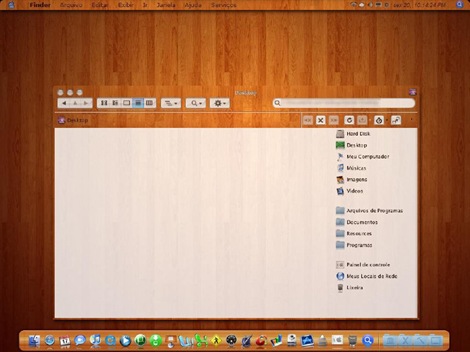
Wood Visual Styles - Transforms everything to wood! This theme is tested in Windows XP SP2. A few people reported problems with SP3. (This theme is no longer available. Sorry.)
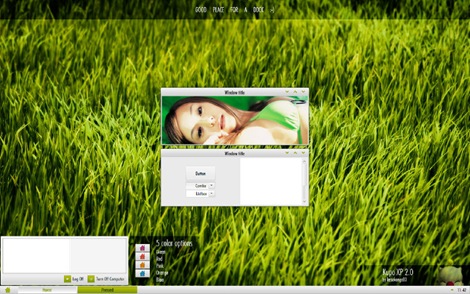
Kupo XP 2.0 - A very minimalistic design available in 5 colors.
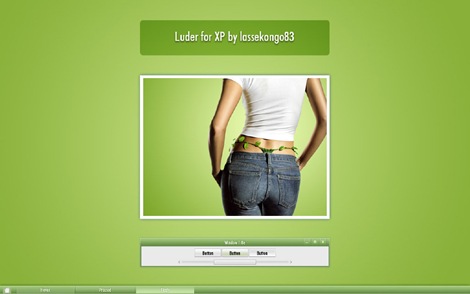
Luder - Another minimalistic theme with a clean green look.
Aurum VS 1.1 - A bit of Vista's Aurora look.
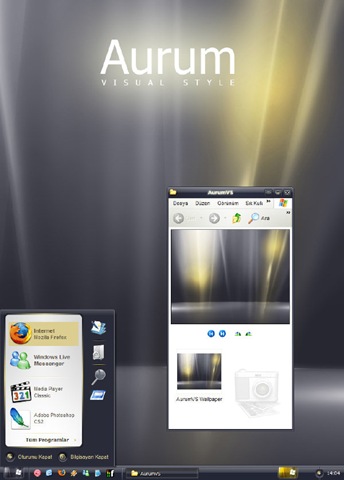
Delta VS - A silver gray theme with mild colors.
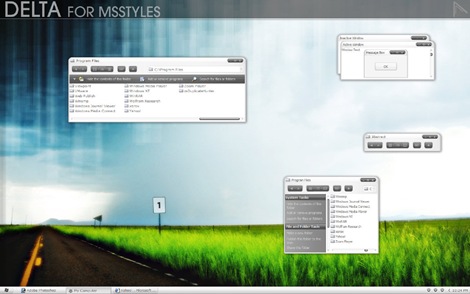
DUO - A mixture of Vista and Mac.
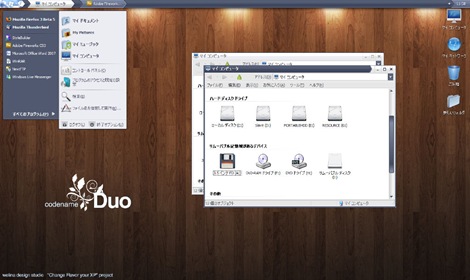
Ubuntu XP - This is the closest Windows XP can get to Ubuntu! Brilliantly done.
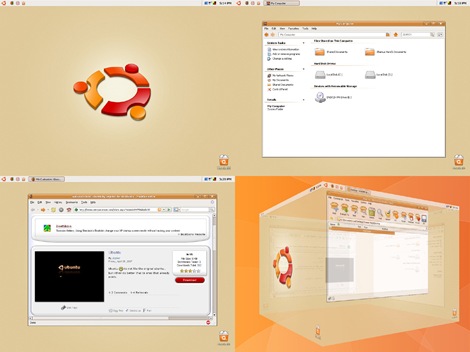
Simplebox - This time it's Fedora. (This theme is no longer available)

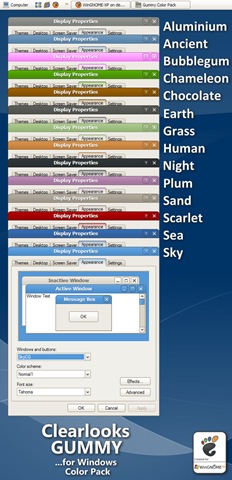
Clearlooks Gummy - This theme pack gives a "Gnome" look to Windows XP. Available in 14 different colors!
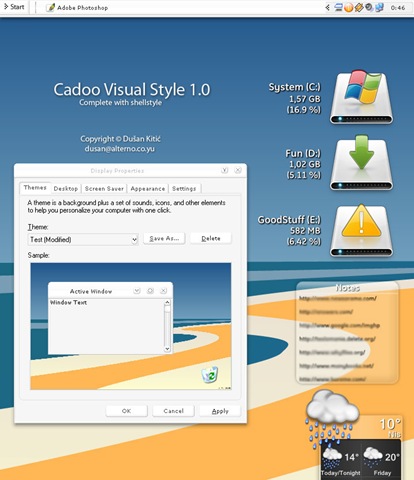
Cadoo Visual Style 1.0 - A smooth whitish theme that gives a great contrast to any icon set.
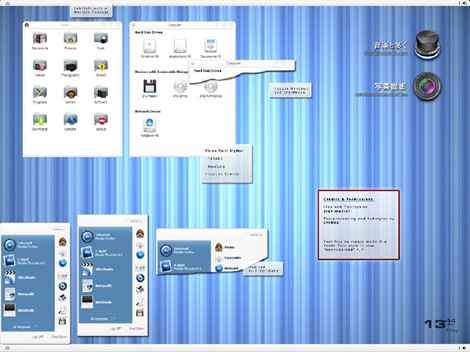
animus - A Mac like blue and white theme that works great with Mac icon set.
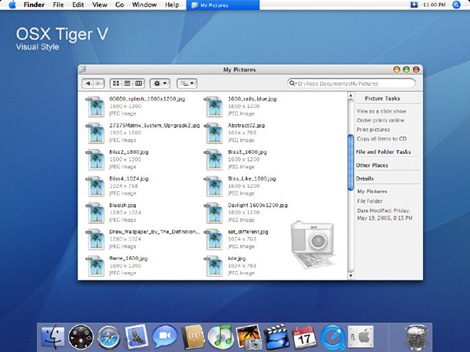
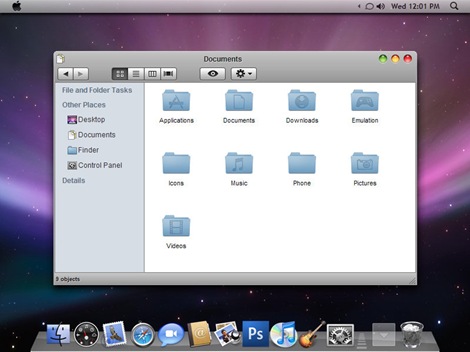
OSX Tiger V - Give Windows the Mac look. Very nicely done.
Leopard X - Another Mac theme with a slightly darker look.
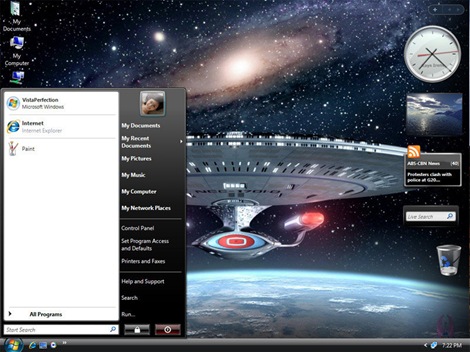
VistaPerfection X4 - One of the best looking Vista theme for Windows XP.
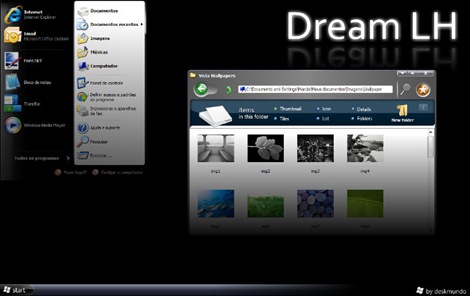
Dream LH 1.0 - Another theme with the Vista look, but darkish and black explorer window and task panel.
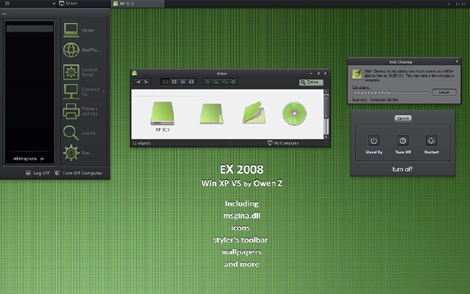
EX2008 Visual Style - A darkish theme with a tinge of green. Very minimalistic.
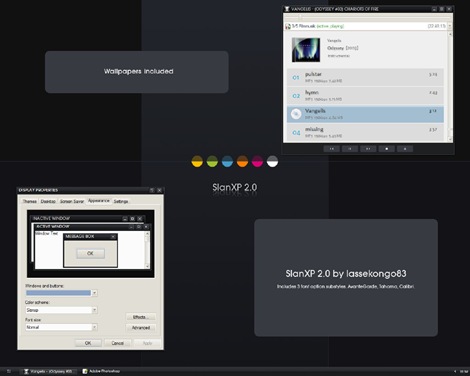
SlanXP 2.0 - Another dark theme for Windows XP.
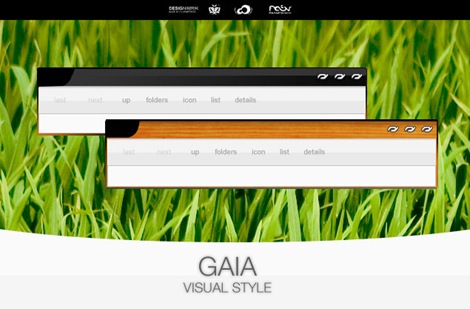
GAIA - A very simple yet elegant theme with mild colors.
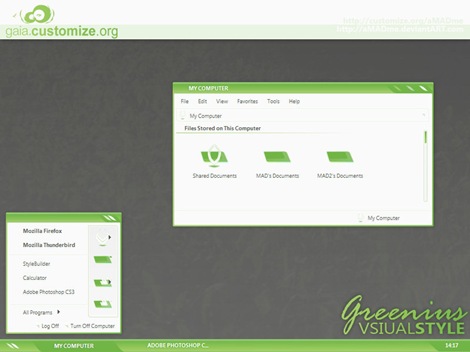
Greenius.VS - Another beautiful green theme. (Green seems to be the preferred color for designers)
P.S: This is how to install the themes:
1. Download and install Uxtheme patcher. During install a message will be displayed that important Windows file are being replaced and will ask you to insert the windows CD to fix it. Just ignore and click "continue"
2. Download the theme pack and copy the folder containing .msstyles and shellstyle.dll (this is inside another folder) to C:\WINDOWS\Resources\Themes\
3. After this is done, right-click on desktop and click Properties. Now click on the Appearance tab. Under Windows and Buttons you will find the list of all the themes you installed. Select one from the list and click Apply.
Sometimes, the downloaded pack contains additional utilites like Styler and Rocketdock etc to bring other changes to Windows. It's up to you whether you want to install the additional stuff. You can visit the original page of the theme author for more instruction on how to use those.
If you liked this, you will also like


i nstalled the theme patcher and leopard and then everything was fine but when i installed rocketdock everytime i click on my docs or local disk or something like that it opens windows search and i cant close it what now
ReplyDeleteSeems like the problem is with rocketdock, or maybe it actually lies somewhere else. Definitely not a theme problem.
ReplyDeletegreat but it becomes off on restarting and shows a problem
ReplyDeletecan i restore it once i do this?
ReplyDeleteJai ho theme maker ji...
ReplyDeletewwwwooooooowwwwwwwww
ReplyDeleteit's good
ReplyDelete..................................................................................................................................................
Thank you, my friend already received a beautiful thing from your site
ReplyDeletethankx
ReplyDeletethanks
ReplyDeleteMASHALLAH.... some of most beautiful themes onthe wierd internet..........
ReplyDeleteBEST THEMES EVER
ReplyDeletemac like themes amazing
ReplyDeleteits not running
ReplyDeleteits very difficult to download and install and I want that it must be very easy
ReplyDeleteThese themes are awesome but how can i use them on xp
ReplyDeletemy customs theme's keep run turning back to the original theme's of windows every time i restart my pc any comments how to permanently apply my DreamLH theme?
ReplyDeleteits awesome
ReplyDeletehow to set
ReplyDeleteits really very good...........
ReplyDeletegoooood
ReplyDeletetanks bro
ReplyDeletethanks Nice themes
ReplyDeletetnks a lot
ReplyDeletegood themes but i was expecting little more .
ReplyDeletebut then also they are really good.
thank you
thx
ReplyDeletevery nice is themes for windows xp
ReplyDeletecool kick ass themes
ReplyDeletevery beautiful work! may god bless you!!!!!!!!!!!
ReplyDeletethanks man
ReplyDeletethis is March 12th 2012 and i still using XP and Pentium 3. GREAT!
ReplyDeletefrnds it fully works on winsows azure i can download free full version azure it looks wonderful winsows azure is wonderful skin its like a dream you can buy the cd with 12 skin colors free
ReplyDeletemain ne abuntu xp by shamuhand theme load ki thi but he is not properly installd.... please help me
ReplyDeleteThanks dude, this is awesome !
ReplyDeleteThanks man ........you made my day
ReplyDeletebest to break this
ReplyDeletei did as you said.. but after copying those files, still nothing's displaying in the properties.. no new themes are getting added into it..!! what do i do now??? please help...
ReplyDeleteThese themes are super duper hit
ReplyDeleteJust download bumptop and you will get 3D desktop a super coOoOol one!
ReplyDeletemy pc is modified inti new becoz of this themes..
ReplyDeletei lik these themes very much....
easily accessible.........
good theme
ReplyDeletevery coooooooool
ReplyDeleteAwesome collection Kaushik
ReplyDeletehey hwo too install plzz tell me..
ReplyDeleteits an awesome
ReplyDeleteI download (leopard X) and it says to choose open with (Win-RR) or save as .
ReplyDeleteI choose save as and what can i do to use that themes??????
can u help me.
all themes r ExElLeNt
ReplyDeleteThnx due...really nice themes
ReplyDeletewow i like the seven RG theme.. just read the notes first before installing it,for you not to have problems. follow instructions on each folder,heheh... then it will just work fine, love it!
ReplyDeleteNone of any themes worked... :X
ReplyDeletesome themes do not work
ReplyDeleteAwesome themes man !!!
ReplyDeleteGreat list.
All those windows haters just go and play tetris on your computer and leave us alone.
Its simple:
Windows=awesome games
linux users=install bumblebee and enjoy!!
very nice theam......
ReplyDeletei like u theams...
Aurum looks excellent! if I had xp I would install it!
ReplyDeleteThank u! DUDE!! :D
ReplyDeletecool themes
ReplyDeleteVistaPerrfection_x4 is the coolest theme i had ever apply to my computer!!
ReplyDeleteI Have downloaded vistaperfectionx2 theme and uxpatcher.but how can i install and apply it?plz help [email protected]
ReplyDeleteNice Themes Tnx for sharing. :-)
ReplyDeleteawsome.......
ReplyDeleteWow....thank you!
ReplyDeletewhere i put .dll files?
ReplyDeleteYe .dll files kis folder mein dalni hain?
Thanks, All seem well. MAny thanks
ReplyDeleteAmazzziinngg Themes,,,,!! cooollest ones...!!!
ReplyDeleteHey! why the "Clearlooks Gummy" theme didn't have .msstyles or the .theme file but .7z file?? please fast reply
ReplyDeletei download the theme but how to apply it?????????
ReplyDeletehey you are seraching for more
ReplyDeletevisit: http://adf.ly/9kZFa
hey i hav dwnloaded d themes but these r nt shown in my properties dialog box...nd so m unable 2 use it.....
ReplyDeletetried a lot...canot do..even i copy files on themes folder its unseen in the windows and tabs button!PLS HELP
ReplyDeletemind bloing dudes
ReplyDeleteJUST INSTALL THE STYLER. THEN THEMES WORK PROPERLY
ReplyDeleteHere Download the 30 Themes Installer- (For XP)
ReplyDeletehttp://www.winxp76.com/Bunker/index.php?dir=Windows/&file=30%2B%20Windows%20XP%20Themes%20Installer.rar
Aero- and MANY More types of themes are in the installer.
-take care
**I added the Theme Patch too! (In Case You Need it)
I think the regular theme looks beautiful. :|
ReplyDeleteHey My Computer is not accepting any of it and I have the patcher. Please reply:(
ReplyDeletehey dude can you help my with ubuntu, i can't figure out how to install it. please help me
ReplyDeletewow great themes ur rock
ReplyDeleteany one not apply just download pack longhorn inspirat and then apply this themes it will work
I've looked at the newer customization routines, but still prefer the UxTheme stuff. I just tried all the others and have settled on Ubuntu XP, I'll stick with that. Great system, beats Windows totally.
ReplyDeleteRegrettably, the Ubuntu developers have an immature attitude toward others. Anyone NOT completely committed to using a Linux distro, is considered not worth assisting. They cannot tolerate anyone who cares to use a computer by any any other method than memorized keyboard commands.
Because I prefer a computer that will remember for me (as in right click sub-menus, and a decent GUI)I am see at Ubuntu as unworthy not welcome there.
Frankly, I think that sort of tribal mentality is shortsighted.
Ubuntu, I believe, is an excellent OS for a machine with a limited number of major applications. It is stable, secure, and safe.
However when Ubuntu is used in the capacity of many Windows machines, where the user has major games, the Adobe Creativity suite, the Microsoft Office package, and the hundreds of legally downloadable apps that many of just have to try out, it will reliably fail and be difficult to diagnose, and even more difficult to fix--occasionally impossible to find drivers for, and there is a limitation in mainstream applications because Ubuntu is not widely used.
Sooooo. . . Have fun.
Any1 WITH PROBLEM WITH APPLYING THEMES KINDLY LOOK HERE!!!!!!!!!!!!!!!!!!!
ReplyDeleteit's all simple just download and install UXteme patcher for xp sp2 or sp3 if u have 1 of these
then open the patcher
it will ask some question and then it'll ask for ur computer to reboot
reboot the pc and then download any theme
Extract it using WINRAR if u dnt have then download it
right click on the rar file and click Extract file and the computer will ask that where to extract the theme files and the theme itself
after the extraction poen the folder in which u extracted the files then u'l probably see a folder named the theme name open the folder and u'll see a strange lukin Icon it will have a brush in it double click it and the properties windows will appear showing the theme and just simply apply it there u go!!!
If still FACING some PROBLEMS plz cmnt below and i'll be happy to answer u within 24 hours cause I visit this web site daily to solve ur problems and also to download themes
Chao!!!! I hope it will work
gud luking but the delta vs is corrupt
ReplyDeletesir i download it and then i copy it to C:/windows/Resources/themes.....
ReplyDeletebut it couldn't work : (((
Help.>>!!!!
Thanks so much for posting & sharing it
ReplyDeletehow can build my onw windows Xp, what i means is that, i don't want to download any theme, what i want is to customize them; so what can i use for the porpose?
ReplyDeletebefore u do anything make a system restore..
ReplyDeletethis is Excellent
ReplyDeletewow nice
ReplyDeletehi! i think the file is infected!!(Trojan) feel free to correct me if i got it wrong
ReplyDeleteWhat the hell...is this approval...
ReplyDeleteit means u will only approve the comments which you like..
this is fake...and disgusting..!
Really Nice Themes ........
ReplyDeleteThanks For this Awesome Post...........:)
Nice! Thanks, they all look awesome :)
ReplyDeletegood soft
ReplyDeletenice
ReplyDeletebro i cant that download uxtheme patcher
ReplyDeletehelp me how to download that plzzzzzzzzzz
I downloaded the vista theme for xp but the color background is just the that changes.. There's no background image at the icon didn't change.. What should i do? Please help me.. THANKS!!
ReplyDeletethe creator is very good and the themes are lovely
ReplyDeleteHEYYY THESE ALL WORKS
ReplyDeletei downloaded Tiger and Leopard themes along with the Patcher.. But still i do not get either of the themes PLEASE HELP :)
ReplyDeleteThank Q very much for me all the themes are good.
ReplyDeletedhasu hai yar aise hi karte raho
ReplyDeleteHow do i put the font on the themes?
ReplyDeleteThese are very bad themes and not working any clue about these.
ReplyDeleteThe themes are very attractive. I hope these will work.....but , i want to know that if i install anyone , will i able to remove or disable i.e restore or use default theme again ? Please help
ReplyDeleteYes can revert back to the default theme at any time.
ReplyDeleteThanks very much KAUSHIK
ReplyDeleteWonderful and Beauriful Theme
ReplyDeletenice themes
ReplyDeleteThank you, man, is there a Windows 8 Theme for xp
ReplyDeleteSo beautiful
ReplyDeleteGood job
ReplyDeleteWow! Thanks for Sharing...
ReplyDeleteit's really nice
ReplyDeleteDream LH 1.0 looks great, i must try this,, thanks for sharing.!
ReplyDeleteAwesome! its really Helpful...
ReplyDeleteWow !!!
ReplyDeleteSimply awesome collection, mate ! :)
good work............jiii
ReplyDeletethanks all themes working
ReplyDelete