
 YouTube is very addicting. Unfortunately you cannot afford to just sit there all day watching people perform silly antics on camera. You have others tasks that demand your attention – mails to reply, presentations to prepare, websites to design.
A simple way to continue working while enjoying a funny video or the highlights of a football or cricket match is to watch YouTube on a standalone player. Covering the entire monitor screen with the YouTube page when the actual video runs in only a small quadrant isn’t the most productive way to watch YouTube. Instead, you can run the video in a dedicated window of a standalone player, drag the video window to a corner of the screen and watch it while you work.
Sprink is such a standalone WPF-based mini YouTube client for Windows.
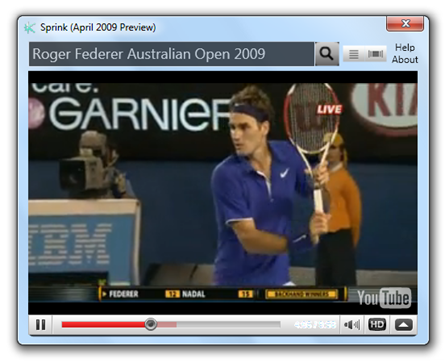


It has search, list view and a 3D CoverFlow view. Looks cool, yes! But I’m going to disappoint you: Sprink is only for Windows Vista and Windows 7. If your using Windows XP or any other OS, you can use a simple media player instead.
To watch any YouTube video on a media player like VLC or GOMPlayer, first get the URL of the YouTube video from the browser’s address bar. YouTube URLs have the following format. http://www.youtube.com/watch?v=p9R05qQuHVg
Now change this URL to this: http://www.youtube.com/v/p9R05qQuHVg
Notice that I removed “watch?” and replaced “=” with a “/”. Now just open this URL in your media player.

Ok. i used to love Youtube cause i could just save my songs to my playlist, then click on "play all" and then i would listen to all the songs i'd saved. NOW, Most of my songs are being skipped because "SME restricts playback of this video in playlists." pleeassee, for god's sake, fix that! Skipping my songs? that's terrible! It mostly skips the ones i WANT to listen to. that's not fair, it's stupid. i get on Youtube to listen to the songs i like, and now they're being skipped? No one wants that :/
ReplyDelete