When Microsoft removed the start menu from Windows 8, a lot of things got removed as well. One of them is the Recent Documents menu. Personally, I like to keep that thing turned off but many users rely on it to access their current documents with ease. On the Start Screen, which is the start menu equivalent in Windows 8, there is no automatic filling of the most frequently used and most recently used programs and files. In fact, that functionality has been entirely ripped off the Modern UI interface. But don’t worry, some of this functionality is still available on the desktop mode, albeit in a different way.
The Recent Documents menu is gone but Jump Lists are still available. To access them you have to pin your favorite programs to the taskbar. Once you’ve done that, you can right click on the pinned icon and see a list of recent files accessed by that program. This way you get program specific “recent documents” menu.

You can expand or shrink the size of the Jump List and the number of files listed. The Jump List properties are in the taskbar properties, just like in Windows 7. To view or change the settings, right-click on the task bar and select Properties from the options menu. Click on the Jump List tab and adjust your settings according to your preferences.
Jump Lists are fine if you have those programs pinned to the taskbar, but for those who still prefer the old way here is the good news: it’s still available, just not listed in the traditional way.
To access your Recent Documents list, press Win+R to open the Run dialog box and type “recent”. Hit enter, and you will be taken to the location C:/Users/<Username>/Recent in Explorer where you will see all your recent activities such as files and folders accessed, URLs opened and programs launched including Metro apps. This list is of everything you have accessed and is not filtered down to a limited number of items. That means that you will have to sort through a large number of items. You can make this easier by grouping items by type or date.
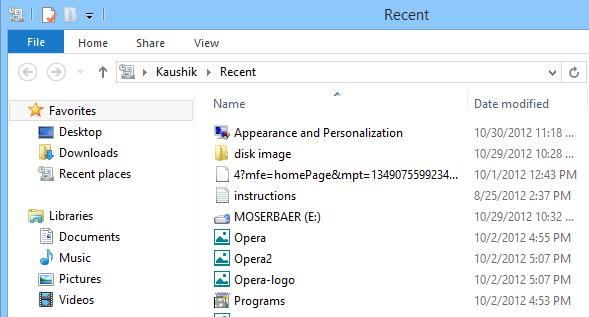
Now that you’ve found where to look for your recent documents, you can pin this folder (actually a symbolic link) to the Start Screen.
To do that, open Explorer if it’s not already open, expand the ribbon menu by clicking on the down arrow on the extreme right. Then click on Options. In the Options window, click on the View tab and uncheck the box that says “Hide protected operating system files”.
Open the folder C:/users/<username> in Explorer. Right click on the shortcut to Recent and choose “Pin to Start” from the menu.

This will add a Recent tile to the Start Screen. You can now edit the appearance of this tile using OblyTiles.
Don’t forget to revert the change you made under Options window in Explorer, i.e. make protected operating system files hidden again to prevent any untoward incident.
Thanks Bennett Adelson


This is bullshit. I won't upgrade until it is made as easy as in 7.
ReplyDeleteNonsense! This does not work at all. When I try this I get a message from the Win+R dialogue saying there is no 'recent'. If I check in Windows Explorer, I have no folder or shortcut called 'Recent'.
ReplyDeleteYep,I get the same message
ReplyDeletePlease verify whether the folder C:/Users/Username/Recent exist.
ReplyDelete@Annonymous. I got that message too. I eventually found "recent items" in:
ReplyDeleteC:\Users\[me]\AppData\Roaming\Microsoft\Windows
it appears to be the same thing. I have no idea why some users have the recent folder in their user directory and some don't, but everyone seems to have one in appdata - would be nice if there were more references to it as the definitive location instead of users/recent.
The Windows+R, Recent, works just fine! Easy to use, just needed to know, and here it is! Many thanks!
ReplyDeleteTyping recent into Windows+R gave me error also. But thanks to agnieszka his/her folder of recent items *does* exist. I made a shortcut to it, and placed this shortcut in the c:/Users/username folder and renamed it recent so that all works ok now.
ReplyDeleteSame old same old. Every time those idiots at Microsoft "upgrade" something, then things that were dead easy in the old version suddenly become complicated.
ReplyDeleteI AM READY TO GO BACK TO XP. What is the sense of bringing out different operating systems if they are not user friendly. I am learning to navigate my windows8, but when I save my word processor document to file, it does not show up on the file explorer. I am getting pretty discusted over this.
ReplyDeletewindows 8 - START PAGE - type "recent documents" - and there we go!!!
ReplyDeleteHi There. Yes angry it makes us. I suggest upgrading to 8.1 and then you have the option to boot to desktop available. Also spend the time to delete all the junk out of the start screen and you can make it as familiar as the old start button.
ReplyDeleteWindows+R 'recent' does not work in Windows 8.1 64-bit edition. When I try that, it gives me an error that the directory does not exist. However, if I navigate to C:\users\myname\AppData\Roaming\Microsoft\Windows\Recent' I can see the recent documents.
ReplyDeleteexcellent post - thank you!
ReplyDeleteWorks well with my Windows 8.1 64bit. Thanks
ReplyDeleteThis really doesn't work for me. I want recent documents, not recent items. Recent items shows me all the folders I have opened recently, along with the documents I have opened recently. I don't need all the other items, just documents.
ReplyDeleteRANT: It is too bad Windows 8 got rid of so much functionality I was familiar with. I also don't like how approximately 100% of the answers to Windows 8 issues is to go to the Start Screen and start typing in....... Really? Microsoft doesn't know exactly where any of its stuff is? They basically want us to do a search to find everything that was on the Start Menu in Windows 7, which they did away with.
very simply:
ReplyDeleteWhen the icon of Word or Excel or any other application is placed on the taskbar, Right click on the icon will display the list of the Recent documents for the application you click on.