
Do you know what I hate most about Windows XP? It's look. It's painful combination of blue and green. So one of the first thing I do after every Windows install is patch the Uxtheme file so that I can apply a visual style of my choice. I hope you are not using the default theme, are you?
The following is a list of some of the choicest visual styles that can give Windows XP a total makeover. Pick any!
Note: This list contains only shell styles that can be applied directly by patching Uxtheme or through StyleXP. No Window Blinds skins here.
Also see
Another 25 beautiful Windows XP themes (A fresh new collection)
25 beautiful Windows Vista themes (For Windows Vista users)
32 gorgeous and unique Windows 7 themes
25 beautiful icon sets for Windows
21 most beautiful mouse cursors for Windows
Watercolor Arrow - This theme looks so cool with a light colored taskbar, blue menu and funny hand-drawn type icons.
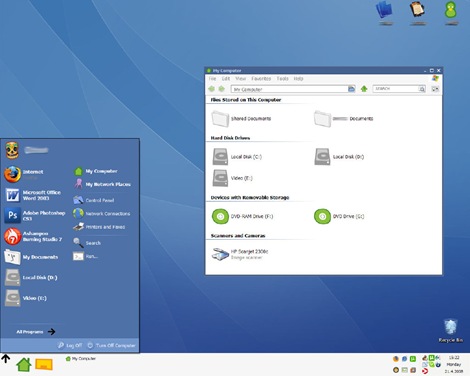

Wood Visual Styles - Transforms everything to wood! This theme is tested in Windows XP SP2. A few people reported problems with SP3. (This theme is no longer available. Sorry.)
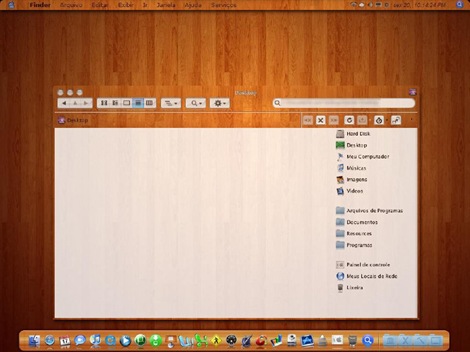
Kupo XP 2.0 - A very minimalistic design available in 5 colors.
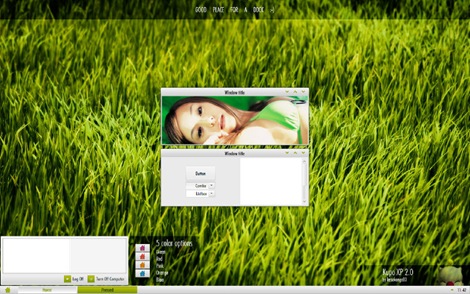
Luder - Another minimalistic theme with a clean green look.
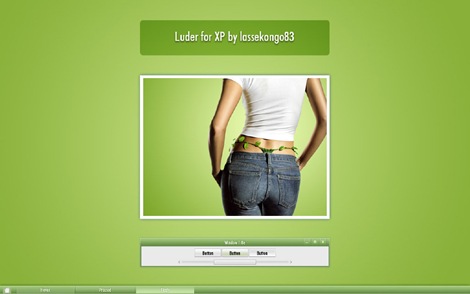
Aurum VS 1.1 - A bit of Vista's Aurora look.
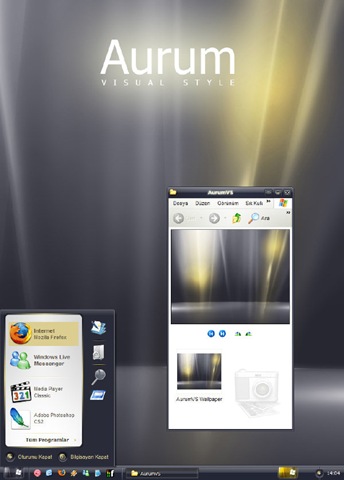
Delta VS - A silver gray theme with mild colors.
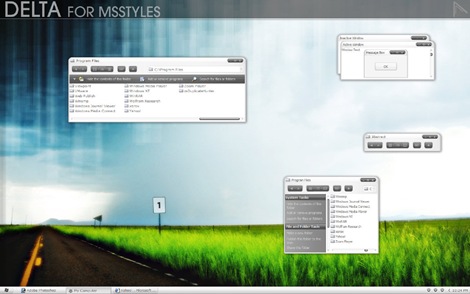
DUO - A mixture of Vista and Mac.
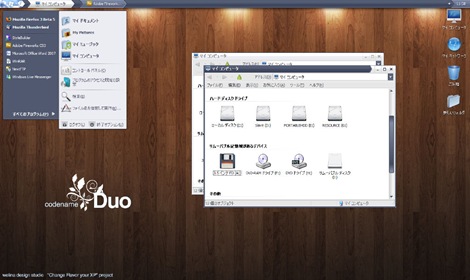
Ubuntu XP - This is the closest Windows XP can get to Ubuntu! Brilliantly done.
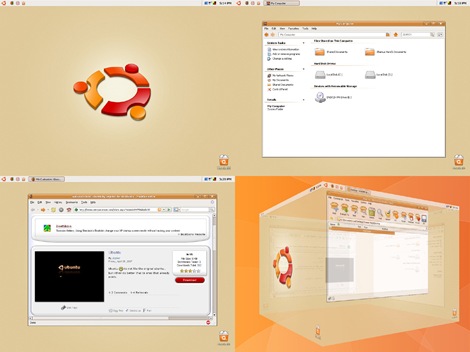
Simplebox - This time it's Fedora. (This theme is no longer available)

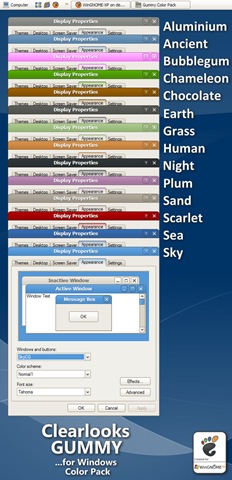
Clearlooks Gummy - This theme pack gives a "Gnome" look to Windows XP. Available in 14 different colors!
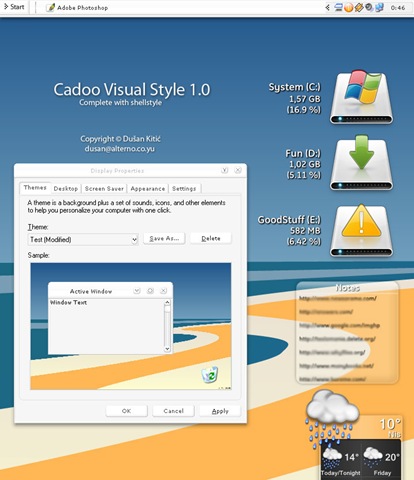
Cadoo Visual Style 1.0 - A smooth whitish theme that gives a great contrast to any icon set.
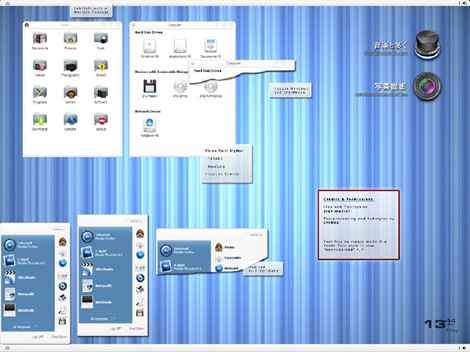
animus - A Mac like blue and white theme that works great with Mac icon set.
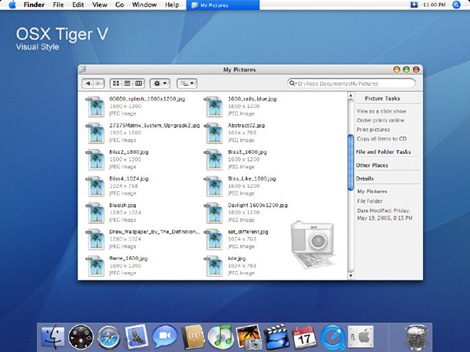
OSX Tiger V - Give Windows the Mac look. Very nicely done.
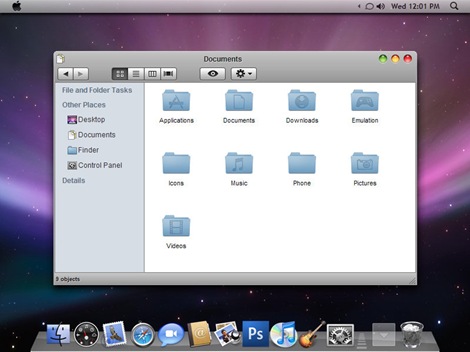
Leopard X - Another Mac theme with a slightly darker look.
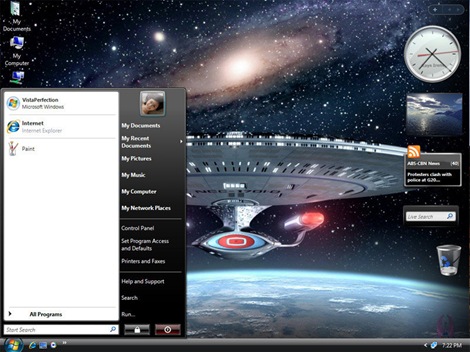
VistaPerfection X4 - One of the best looking Vista theme for Windows XP.
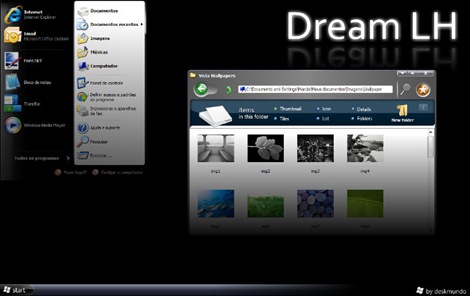
Dream LH 1.0 - Another theme with the Vista look, but darkish and black explorer window and task panel.
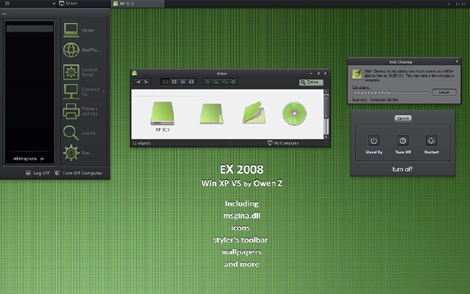
EX2008 Visual Style - A darkish theme with a tinge of green. Very minimalistic.
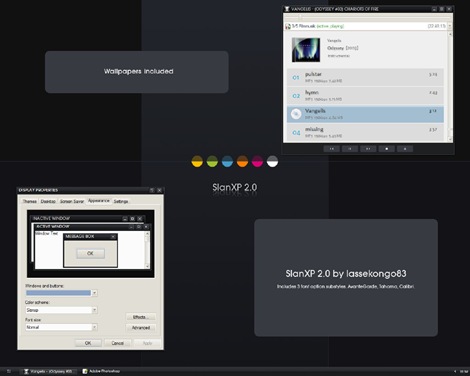
SlanXP 2.0 - Another dark theme for Windows XP.
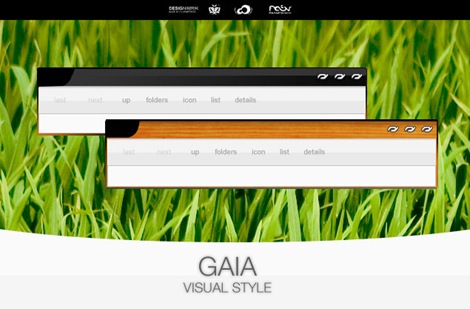
GAIA - A very simple yet elegant theme with mild colors.
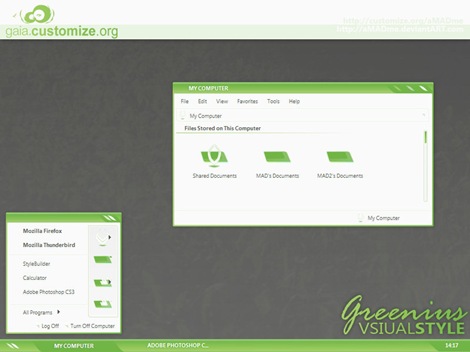
Greenius.VS - Another beautiful green theme. (Green seems to be the preferred color for designers)
P.S: This is how to install the themes:
1. Download and install Uxtheme patcher. During install a message will be displayed that important Windows file are being replaced and will ask you to insert the windows CD to fix it. Just ignore and click "continue"
2. Download the theme pack and copy the folder containing .msstyles and shellstyle.dll (this is inside another folder) to C:\WINDOWS\Resources\Themes\
3. After this is done, right-click on desktop and click Properties. Now click on the Appearance tab. Under Windows and Buttons you will find the list of all the themes you installed. Select one from the list and click Apply.
Sometimes, the downloaded pack contains additional utilites like Styler and Rocketdock etc to bring other changes to Windows. It's up to you whether you want to install the additional stuff. You can visit the original page of the theme author for more instruction on how to use those.
If you liked this, you will also like


I wonder why MS locks the theme ?????
ReplyDeleteI mean if anyone wants Windows to be pretty it would be MS no ?
So is this path "safe" security-wise ?
I don't know why Microsoft locks it, but it's absolutely safe to break it.
ReplyDeletehow do i use these?i downloaded one but i can't figure out how to apply it...
ReplyDeleteWhoops. Sorry about the last comment. You need to apply a UXTheme patch: http://thirderror.com/unlock-custom-themes-on-windows-xp/
ReplyDeleteHow do I use it? I did download it but just don't have a clue how to apply it... please help
ReplyDeleteyeah, I downloaded/installed the uxpatcher, how do i use it to install new themes?
ReplyDeleteInstructions to install themes are added to the post.
ReplyDelete@mintywhite: Nice collection there. :)
ReplyDeleteWhen I try to run uxpatcher it says I have a Windows NT setup folder in C:/programfiles/window/ It says I should take my windows NT disk out of the drive or move that folder somewhere else but I don't see the folder it's talking about and I don't have a Windows NT disk in the drive. It just say's click ok to exit and won't let me proceed, please help I want some eye candy.
ReplyDeleteI'm sorry it is c:windows/I386 that is supposed to be the location of the file
ReplyDeleteThe best theme in the world for shitndows is here:
ReplyDeleteDownload and enjoy!
http://www.ubuntu.com/getubuntu/download
Some of theme are very nice, but
ReplyDeleteMany themes are bloatware that slow down your systems consuming loads of RAM, messing up the registry and very hard to remove completely!
And, what this the point to make a crappy operating system like windows look like another one?
this is a mess!
ReplyDeleteHey this is awesome!! I've been trying to figure this out for ages :P Thanks a ton!
ReplyDeletelitestep.
ReplyDeletewell i m sorry kaushik but friend when i downloaded n installed as u prescribed ..i couldn't get the look of "Leopard X - Another Mac theme with a slightly darker look" theme as shown in the upper picture...ya there r changes but not exactly as shown in the pic ..it's merely a slight change like side bars n all that but the way it shows in the pic ..it doesn't so can u plz help me out that how i change to such a look as it is shown in "Leopard X - Another Mac theme with a slightly darker look" theme exactly....thanks a lot
ReplyDelete@shashi: The theme creator used several other programs to achieve that look. You will find more details here
ReplyDeletehttp://kspudw.deviantart.com/art/Leopard-X-76664828
when i double click on the icon it says unsupported OS detected. how do i fix this!
ReplyDeleteWhich icon?
ReplyDeleteuxtheme multipatcher 6.0
ReplyDeleteGreat collection of themes
ReplyDeletebest i have seen yet.
and they all work (fairly well)
good job
Hi, pls tell me how to get that Leopard theme working..its not showing the way it should..Pls tell me step by step...my email is [email protected]
ReplyDeletei have good experience about this web site
ReplyDeletebetter then other web sites
so i'm satisfy
MAN I am so lost lots of beutiful themes but i customized one is cool earth themeand lots of glowing fonts and animating startmenu, diffrent control panel!!!!
ReplyDeleteLooks like i'm only one who think that windows xp default theme and wallpaper are best EVER.
ReplyDeletehi, can i use these themes with window blinds???
ReplyDeleteHow do I use it? I did download it but just don't have a clue how to apply it... please help
ReplyDelete@honey: Have you read the article?
ReplyDeleteHow do I get the dock to work like on a mac?
ReplyDelete@tyler: you will need a dock application like RocketDock
ReplyDeletehey how would i instal it....wer is a systemroot
ReplyDeleteInstalling?
ReplyDeleteTheme: Move the Dream LH folder to %SystemRoot%\WINDOWS\Resources
Styler Sklin: Move the folders to %SystemRoot%\ProgramsFiles\Styler\TB\skins\Styler's
Recommendations:
-Disable ShellStyle in FolderOptions and leave only the Styler enabled.
-Use Styler to hide the Menubar (Explorer)
not geeting tis inf....can any explain it
very beautiful themes
ReplyDeleteok sorry im a noob but im having trouble... i installed the patch but the themes dont come with folders, its just a rar file. what am i doing wrong?
ReplyDeleteI installed the UNTheme thing but i cant do the theme.Whenever i click on it, the preview of it is the same theme with a gray background.
ReplyDeleteFor the Aurum skin, does anyone know where I can get the background for it. It looks like gray and copper aurora lights. I just absolutely love it would appreciate it if anyone knew where I could find it. By the way, awesome skins. My favorite is Aurum. (no surprise there)
ReplyDeletehow to apply this themes
ReplyDeleteAnyone having trouble using these themes should read this. MAny of these themes were designed with "cheater" software allowing the designer to cut corners. To install the theme, you will need to purchase one of many shareware automated theme changers available. If you do not have that software, you will need to 1.) make sure your download contains a theme file, not just a visual styles file. 2.) When you try your new theme after placing it in your Windows fileset, and it doesn't work, then the dll file was incorrectly configured by the designer. Really the only way to get around the problems many of you are describing is to download executable installation files for themes ONLY!
ReplyDeleteTo the person having trouble with the RAR files, you need an RAR archiving utility to open the files. Free downloads or 7zip, Filzip, or others are available from many sources.
ReplyDeletehow does one create there own theme
ReplyDeleteCan someone please explain how to apply Leopard X theme?? Which programs do you need to achieve the look like in the picture?
ReplyDeleteDoes anybody know?
When I try to run uxpatcher it says I have a Windows NT setup folder in C:/programfiles/window/ It says I should take my windows NT disk out of the drive or move that folder somewhere else but I don't see the folder it's talking about and I don't have a Windows NT disk in the drive. It just say's click ok to exit and won't let me proceed, please help !!
ReplyDelete@Alex: Read this
ReplyDeletehttp://www.askvg.com/how-to-fix-windows-nt-setup-files-detected-error-message-while-running-uxtheme-patcher-in-windows-xp/
by installing styler.exe in ubuntu.zip u can set leopad theme
ReplyDeletehttp://www.deviantart.com/download/58336736/Ubuntu_XP_by_ShamusHand.zip
One of your best theme "Wood Visual Styles" is "file not found" now. Please reupload again. THANKS.
ReplyDeletei know how to make these themes work...win xp
ReplyDelete1. Extract fold to windows/Resources/themes.
2. Open the folder you want and click the "WINDOWS VISUAL STYLE FILE" and just click apply..cheers
thx the themes rock i downloaded all of theme only one that dont work is vista
ReplyDeleteCan anyone please tell me how I can apply that clock with mini wallpaper underneath it onto desktop in VistaPerfection theme?
ReplyDeleteThanks.
i have some tips who downloaded this themes.. if u hav a problem installing this themes try the tune up utilities 2008 or others to install the themes.. on the tune up styler u can install the themes without using patcher.. thats all.. i hope this help..
ReplyDeletei downloaded the file, installed the UxPatcher, extracted the folder to the same download file
ReplyDeleteThen copied it to C:\WINDOWS\Resources\Themes\..
i couldn't find it under apperance - windows & buttons.
under which folder is the .msstyles and shellstyle.dll ?
shellstyle.dll is inside folder "Shell", and .msstyles is outside the "Shell" folder and both of them are inside another folder by the theme name.
ReplyDeletehi
ReplyDeleteI just downloaded and applied leopard x... My computer looks so cool...
Great post with great Themes. I am using Aurum myself, and couldn't be happier. Got a Thumbs Up on StumbleUpon from me! Good Job.
ReplyDeletethis is the best site for the themes of windows xp
ReplyDeleteto Kausik: i tried all your instructions posted here, from downloading the Uxtheme patcher, and copying the folder in C:\WINDOWS\Resources\Themes folder but still i cannot find in Appearance: windows and buttons ,the themes that i want to apply, i always saw the windows classic there.
ReplyDeleteits weird I downloaded "DUO" but I don't have the background image like it show does any one have it??? Help would be much appreciated!
ReplyDeletePS. THE THEMES HERE ARE BEAUTIFUL
@Lj: Background wallpapers do not come with the themes, and no, I don't know where to get that :)
ReplyDeleteAhhhhhh! Thats too bad!
ReplyDeleteThanks for the fast reply!
Nice
ReplyDeletei hav downloaded this theme but how to apply this on computer screen
ReplyDeleteWow great themes! Thanks!
ReplyDeleteSwat Khan
http://www.yo-swat.com
Anybody have a link to the best looking theme.
ReplyDeleteWood Visual Styles ?
stupid directions!
ReplyDeletehi.. thanks for great themes.. does anyone knw where i can get some great wallpapers or the wallpapers in these screencaps
ReplyDeletethanks a lot for the cool themes..they r really awesome..
ReplyDeleteHow to install leopard x theme....? I tried but it doesn't look like on picture... Please....
ReplyDeleteAmazing article....I have been thinking of changing the XP themes since ages...but couldn't do so. However, this article just solved my issue.Thanks...
ReplyDeleteAlso I would suggest if you could include the comment # 5 by Jason ....as it really made unlocking thing simple
wow, this is very beautiful themes. and this is very usefull for me.
ReplyDeletethank you admin.
The only theme I'd like to use (wood visual styles) doesn't work anymore lol. Keep lookin' for a wood style.
ReplyDeleteWhat a mess. it defaulted me to windows Classic, and cant go back!!
ReplyDeletecan someone tell me any site for more themes of movies ....my e-mail is [email protected]
ReplyDeleteThanks a lot.^^
ReplyDeletehi,
ReplyDeletethanks a ton for these cool themes, I installed UxPatcher, and followed the instructions as given in the post, but I dont find the shell folder in the downloads .. so its not working,..where is the shell folder?
awesome man ..........
ReplyDeleteu people just toooooo god in making these themes
nice job keep it up man
..dude...hpw do i install it???
ReplyDeletei placed one older in Resources as instructed.
but there is no "styler" folder in system root?Program Files as the readme says....plzplzplzplzplzplzplzplz HELP!!!
Also, therez no Styler option in Folder options as the readme says!!
ReplyDeleteI did it...themes applied..but is there no wallpaper With the theme??
ReplyDeletethe ubuntu visual style??its gr8...but how do i apply the ubuntu logon screen???PLZZZZZZZZ HELP???
ReplyDeletethanks for the themes
ReplyDeleteplease help me the leopard x theme i can't install.. it is said that something in the theme file is missing. i really love this theme.. please help me! thanks alot in advance!!
ReplyDeletegOd bLess!
Nice themes. I think many of those themes will not bother you since they are not limited to blue or green. I like Windows XP and hope peoples should not dislike windows also.
ReplyDeleteModern Technologies
All the themes R gud.........
ReplyDeleteVista Perfection looks just like the Vista theme, Wow :P
ReplyDeletea very beautiful windows xp thems
ReplyDeletethank you...................very much........
ReplyDeletefor xp sp3 I had to use this http://www.softpedia.com/progDownload/SP3-UxTheme-Patcher-Download-98929.html
ReplyDeleteinstead of the recommend patcher which only works through sp2.
Cheers
uu guys are the bomb.........more power to youe elbow...really feeling ya
ReplyDeletethanx 4 sharing!
ReplyDeleteI was searching 4 sumthng new... and these gotta be the right "search stop" 4 me.
thanx once again!
hope u'll continue sharing the newest on the web!
signin' out
-Cyberion
how to install it??????
ReplyDeleteHow to make this themes?
ReplyDeletehow do i do this ?? please :S
ReplyDeleteToo bad I have XP/Service Pack 3 so it doesn't work for me :(
ReplyDeleteI've tried following the steps but it doesn't quite work the way I wanted it too. Ok, so I've found the shellstyle.dll and put it in my Resources/Themes folder but I can't find the .msstyles anywhere. I've spent like 1 hour looking for it in System32 and some other folders under Windows and still couldn't find it. Perhaps this may be why the theme doesn't work the way it should. I downloaded the VistaPerfection X4 (the Startrek one) and put it into my Themes folder and I see it in the themes drop down menu but when I applied it it doesn't show the space ship. All it showed was a light blue background and everything else stay pretty much the same way as before. Ahhh this is more complicated than I thought it would be.
***Solution on how to get it to work!***
ReplyDeleteOk I'm the frustrated guy from the previous post and I'm back with a better and simpler solution, well not really but bare with me here lol.
From what I've learned from experimenting with different ways to get it to work, I found the best way is to just download the UXTheme for service pack 1 or 2 but if you're using a newer computer it is most likely running service pack 3 and that does make a big difference as I have found out through numerous attempts of trial and error. For service pack 3 user you need to download UXTender for this to work. You don't need the .msstyles because as I had found out it is impossible to locate even with a search and the shellstyle.dll should already be there as a default from the built in Windows theme so no need to worry about this part.
Instructions for SP3 user:
(1) Google UXTender and download.
(2) Install it (should take a split second).
(3) Restart computer for it to take affect.
(4) Download your favorite themes and save it under c:\WINDOWS\Resources\Themes. Actually you only need to either copy or directly drag only the executable file (either the description says Windows Theme File or Windows Visual Style File either one would work once the UXTender is installed).
(5) Double click on the executable file once you dropped it in the Themes folder and the rest will take care of itself. Well, maybe not but this is where you should be able to figure it out. Ok, fine once you double clicked it depending on what the file type is, it will automatically take you to a screen where you can select the theme if it's a theme file or an Appearance screen if it was a Style File. Select the appropriate file to be display as theme and hit apply and there you have it.
Follow this link if you're still lost:
http://www.youtube.com/watch?v=7n5GXRB3gto&feature=PlayList&p=6D908224898EFF6C&index=2
It's sad that I have to find that out from a kid but oh wel, he's a very bright kid and he will guide you through it. Also, on his right side panel he provided a link to download the latest and greatest in Windows 7 Themes and other cool stuff so check it out.
***Follow up from the previous post***
ReplyDeleteNote: For best result I recommend downloading Windows 7 Complete Package as it have pretty much everything you would want in a theme, but it doesn't provide "exactly everything" but it's the best one available in my honest opinion. Don't worry I will guide you through how to install the rest of the cool features that I currently have running on my netbook.
(1) UXTender 1.3 download:
http://www.winprj.net/board/viewtopic.php?f=7&t=216&start=0&st=0&sk=t&sd=a&sid=bb42998bdc22ff3b66701d74e4002a74
In the middle somewhere there are two links option side by side, one is download and the other is Donate. Click download. You will need this to make the themes work. Once this is downloaded and installed you are in the clear and free to download any themes you like. Keep in mind the install process takes literally a split second so it happen fast so keep an eye on it. Restart your computer after the install and your computer is set to add the themes.
(2) Windows 7 Complete Package:
http://www.crazythemes.com/windows-7-complete-package-for-xp/2477
You would need a Winrar or some other similar program to unzip the file. Google search Winrar if you don't already have it installed.
(3) Go to where you've unzipped Windows 7 Complete Package (usually under My Computer\Your Name\Downloads) and double click it. Once in find the folder that reads "Vista Rain Bar by gavatx" and select executable file "RainbarEn" and install that. It's an application that allow you to display features such as an old-school looking clock, CPU_Ram meter, calendar and other neat and cool stuff. There are other folders but I think it's not as cool as the one mentioned. I only installed the RainbarEn. Feel free to play around and install other features but keep in mind it will waste memory space and eat up RAM so install only the one that you truly like.
Unfortunately this Windows 7 package doesn't have the cool looking scrolling task bar thingy (it's actually called a RocketDock) so next step is to download that.
(4) RocketDock
http://rocketdock.com/download
Install it and configure it as how you would like. You can add and delete icons from it and it will help make your desktop look cleaner.
**Note**
Only the executable file of either the Windows Theme File or the Windows Visual Style File should go in Themes folder. This is all it will need, but sometimes if on first try the theme doesn't come out right you might want to put the whole folder that accompany the executable file (usually it's right next to it side by side) into the Theme folder because that folder might contain important .dll and other files to make the theme work but what I've found that more times than not you might not need to do that. I hope this helps and good luck on trying to configure your theme.
thanks these are cool but i got a question I dont have Uxtheme so how i got it on my computer?
ReplyDeleteHow can i set theme in a Xp boot CD.If anyone Know plz Send me at ([email protected]). Plz PlzPlz Plz Plz.by
ReplyDeletehi
ReplyDeleteanyone tell me that how these xp themes can apply.or to use them any other supported software?
There`s no continue button when I installed the Uxtheme patcher. :| How will I do this ?
ReplyDeleteAwesome post. Thank you
ReplyDeletehow do i use it
ReplyDeletecant find .msstyles folder plz help.
ReplyDeletethis web site good
ReplyDeletehow to u unstalled the mac theme? cuz it doesnt let me delete the file???? plz get back at me
ReplyDeleteso unorganised, not a good job
ReplyDeleteI was trying to get that Mac OS x theme for ages! now - I have it , Thanks!!!
ReplyDeleteI'm trying to extract the file,but its asking me a password..!!What's that guys???
ReplyDeletePlezzz would just
ReplyDeleteupdate your themes
they've been here like forever!!!!!!!
it is really nice thanks for sharing this
ReplyDeletegive some more details??????
ReplyDeletereally nice website...very handy! loved the themes. thnx a lot!:D
ReplyDeletehwo i used it plz some body help me plllllllllllllz
ReplyDeleteExcellent........!
ReplyDeleteI like it iam shubh mishra mai ese hi theme ki talash me thaa
u can even use style xp or uxthemepatch,
ReplyDeleteu have to keep the unrecognized files inspite of inserting win xp sp2 cd and cancel the protection
is this themes???????????????????????
ReplyDeletegreat its also work xp sp3
ReplyDeletemac theme for xp its look mac great
ReplyDeletedownload FlyakiteOSX v3.0
hey guyz i cnt install my themes and even cnt see any of those files who needed to be copied.plz help me out
ReplyDeletedear..how to use these themes tell me.
ReplyDeletehere it shows different messages then u said..
i had tried..
but can't able to use them.
i am using windows xp service pack 2..
ok.
hope u will reply soon..
Just a Fab.......ulus........
ReplyDeleteBHAI THEMES NAHI VIRUS HAI YE SABHI...
ReplyDeletewow, thankz... nice
ReplyDeleteTHAT'S NICE I LIKE THAT
ReplyDeletei love them an its really esay to apply using winwar
ReplyDeletegreat collections of windows themes thx
ReplyDeleteWindows Vista
ReplyDeleteJust Thank you so much
ReplyDeletewhen we click at download button then a page displaying "missing Plug-in" is show but file is not downloading
ReplyDeleteHey! I have downloaded the Ubuntu Theme. Does anyone know if the 3D works or not?
ReplyDeletecool theme
ReplyDeletecooooooooooooooooooooooooooooool
ReplyDeleternt those d most beautiful ones..??
so wonder..i like it..
ReplyDeleteTHE GAME
ReplyDeleteTo anybody saying that it is not working, I would suggest you read the actual article. More specifically the section on patching uxtheme.dll.
ReplyDeleteTRY DUO IT IS SO ******* AWESOME!
ReplyDeleteThe OSX Tiger V theme is prety good!
ReplyDeleteman you guys roc
ReplyDeleteIf you want to apply these themes easily then download style xp add your theme or shell in it and apply thats it
ReplyDeleteyeah i tried to download the vista perfection.. and something keeps going wrong! i have no idea why it doesnt work!! [email protected]
ReplyDeletePlease let me know when there is a paper theme available.Thanks for the new themes.
ReplyDeletehttp://howtogetridofpimplesfastinfo.com/
thank you for beautiful themes.....
ReplyDeleteI LIKE IT VERY MUCH
ReplyDeletecoooolllllllllll
ReplyDeleteClearlooks Gummy is definitely my favourite of them all.
ReplyDeleteClearlooks Gummy is definitely my favourite of them all.
ReplyDeleteSuperbbbb......
ReplyDeleteHi friends, you can download genuine windows sp2 (multi user) bootable image from the link:
ReplyDeletehttp://www.filefactory.com/file/cbe19d7/n/win_xp_sataa.iso
Key can be found at:
http://www.filefactory.com/file/cbe19d0/n/key.jpg
Use tune up utilities to install themes
ReplyDeletegood themes
ReplyDeletehow to use it
ReplyDeletethis is my favourite themes.
ReplyDeletebest themes i like this themes wonder full!!!!
ReplyDeletepretty good but a whole lot of them could be better with extra large fonts! :D
ReplyDeletehow to apply it ??
ReplyDeleteit's really cool!!!!!!!!!!!!!!!!!!!!!!!
ReplyDeletehey im not able to do it its telling its not a valid theme?????
ReplyDeleteso wats the solution............
thanx dude
ReplyDeleteawesome themes to use
ReplyDeletegr8
ReplyDeletewhen i try to install the uxtheme multipatcter,it tells me to restart computer to complete installation and when i do i don't si any thing it has done and when i try doing it again it tells me to restart the computer again....so can any one help me with this problem please
ReplyDeleteosssom man!!!!!!!!!!!
ReplyDeleteit really wrkd
bestest themes i have ever seen love these themes
ReplyDeleteThese are NOT "bloatware"-if you know ANYTHING about .themes you'd understand Also they do NOT suck up RAM..lol (Wow People!) Anyhow its VERY EZ to install. Do NOT be afraid and its safe to use the Patch to overwrite the file. TY for the Themes. Which I may put into an installer for ease.
ReplyDeleteHere Download the 30 Themes Installer- (For XP)
ReplyDeletehttp://www.winxp76.com/Bunker/index.php?dir=Windows/&file=30%2B%20Windows%20XP%20Themes%20Installer.rar
Aero- and MANY More types of themes are in the installer.
-take care
great keep it up !!
ReplyDeletewww.lern2earn.com
Make's me go always.......................awasome!!!!!!!!!!!!!!!
ReplyDeleteits just not workin
ReplyDeletegoooood
ReplyDeleteoho oho aida aida . charming themes thanx...........
ReplyDeletebak wass window theme
ReplyDeletevery nice
ReplyDeletehttp//vikitube.com
really best
ReplyDeleteits not working....
ReplyDeletepleaze sir,
ReplyDeletesaid me
how to install window Xp 2 ?
said plz.
cant get them need to pay for it
ReplyDeleteCOOL themes!!! i like it all!!!
ReplyDeletei dont mind having the default teme but the leopard one is the coolest one,!,
ReplyDeleteam getting a RUNDll Error when selecting themes. What is the solution
ReplyDeleteFirst one doesnt work
ReplyDeletedownloaded and enjoyed
ReplyDeleteThank dudu.Nice collections
ReplyDeleteI can't find the .msstyles folder. Where is it?
ReplyDeleteaw rakker
ReplyDeletebro you should upload transparent kind of themes
ReplyDeletehow do i fully install it leopard x?
ReplyDeletecoooooooooooooolllllllllllllllllllllllllllllllll
ReplyDeletethanks
ReplyDeletevery nice themes working fine thanx
ReplyDeletethis is very gud theme
ReplyDeleteHere are 30 Themes for Windows XP users + .dll Patch (If needed)
ReplyDeletehttp://www.winxp76.com/Bunker/index.php?dir=Windows/&file=30%2B%20Windows%20XP%20Themes%20Installer.rar
Its put into a installer for you.
how can i use they theme .........................
ReplyDeletewhat the hell is this........................
what about the icons on ex2008 theme..you should change them all one by one?with the icon changer? i mean , is that any other way to change them all with one click?
ReplyDeleteplease reply fast..
how to install it
ReplyDeletemahol hai ekdam sahi
ReplyDeletethank Q very much dude they r really cool
ReplyDeletei luv miley cyrus.
ReplyDelete<3
ReplyDeleteHI! thx for your collection themes, but i really want to know how i can use a picture like i saw it in your site, because when i used that theme, the desktop's picture was not changing. i can't find it from the appearance.tx
ReplyDeletehow to use this themes in professional xp 2006 service pack 2. tell me 03362519253
ReplyDeletehey i dont know how is it work?
ReplyDeleteso please tell me the steps how to workable theme in computer
vista doesn't do anything it just looks like xp and When I try leopard and ostiger it says there is files missing please help with leopard
ReplyDelete